
| A Note on Terminology
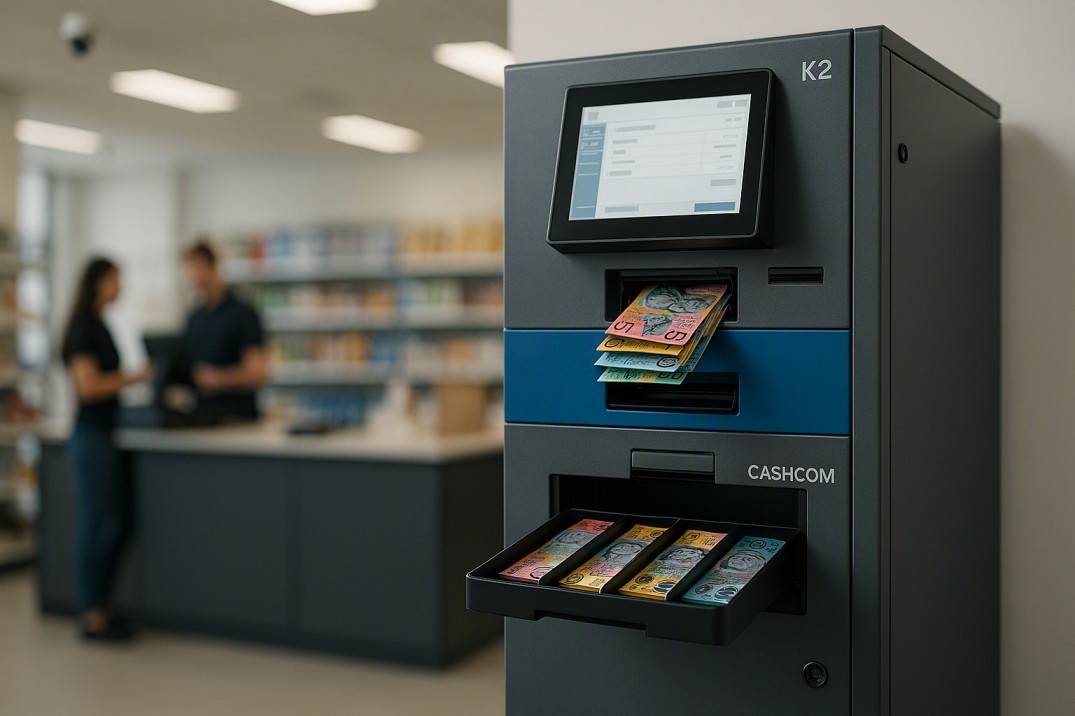
Cash recycler, money recycler, and notes recycler all describe the same machine category. This guide uses these terms interchangeably. The Cashcom K2 Cash Recycler is the specific model referenced throughout. |
| Quick Answer — How a Cash Recycler Works
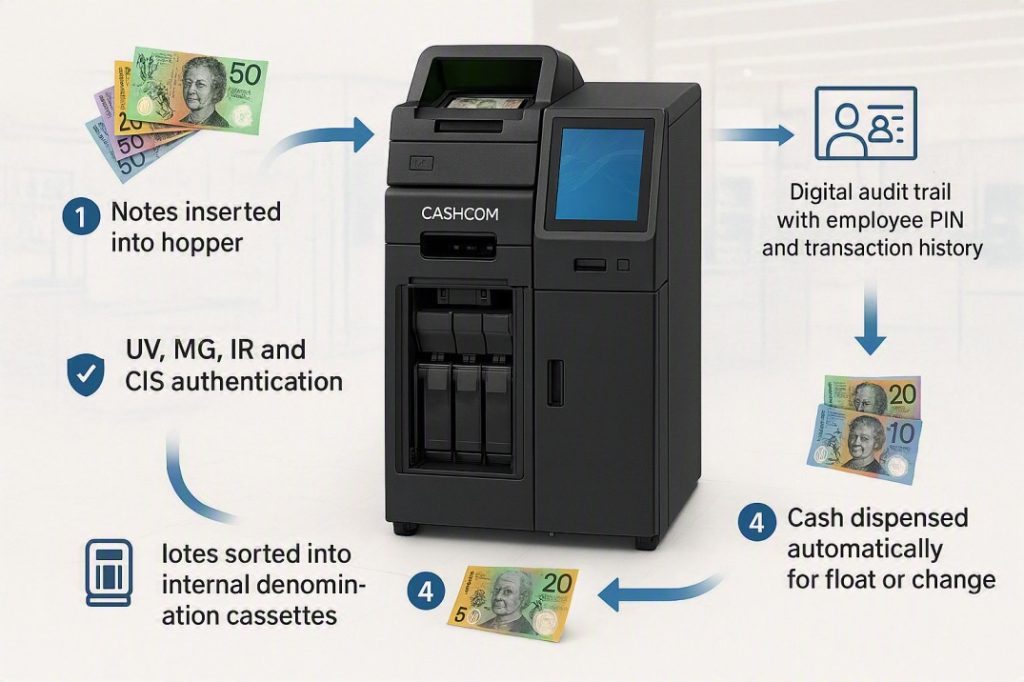
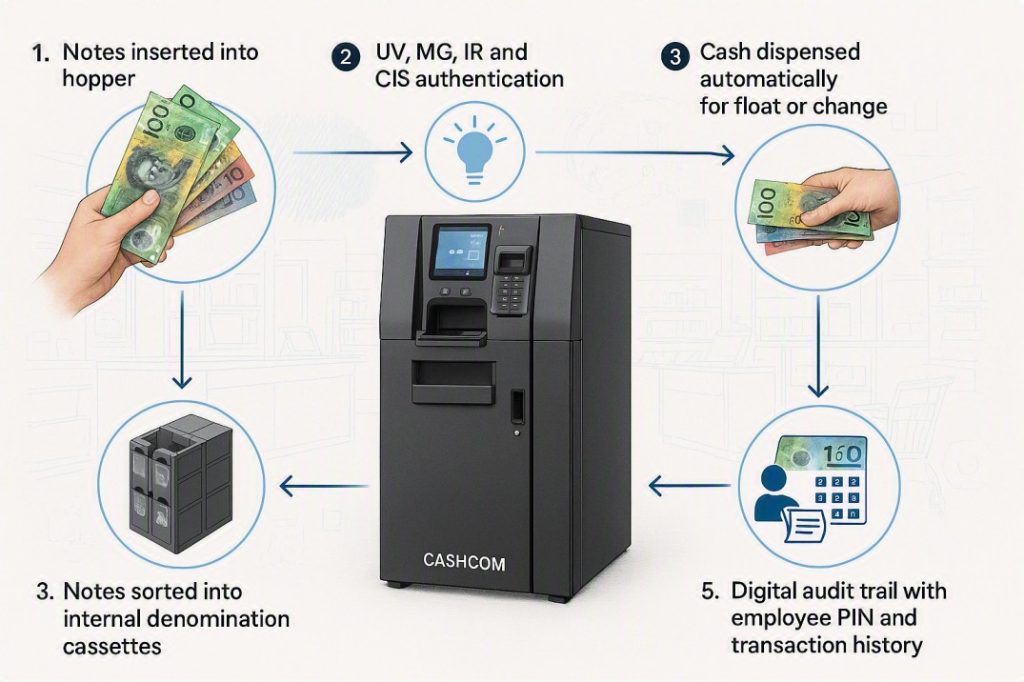
A cash recycler machine works in a continuous loop: • Notes in: staff deposit cash into the hopper. The machine counts, authenticates (UV + MG + IR + CIS), and sorts each note by denomination into internal cassettes. Counterfeits and unfit notes are rejected. • Notes stored: accepted notes stay inside the machine in denomination-specific cassettes, ready to be dispensed on demand. • Notes out: when a till needs float or change, staff request the amount via the PIN-authenticated interface. The machine counts out and dispenses the exact denomination mix required — automatically. • Running record: every note in and every note out is logged against the operator’s PIN and a timestamp, creating a real-time, per-note audit trail. The result: notes deposited by customers become change for the next customer, without manual counting, sorting, or handling between the two transactions. |
What Makes a Cash Recycler Different from a Cash Counter?
To understand how a cash recycler works, it helps to understand what a standard cash counter does — and where it stops.
A cash counter takes notes from a hopper, passes them through a set of sensors to check for counterfeits, counts them, and outputs them to a stacker on the other side. That is the complete workflow. The notes go in, the notes come out, a number appears on the display. The machine’s role is finished.
A cash recycler starts with exactly the same process — notes in, sensors check, count recorded — but then takes a fundamentally different path. Instead of outputting authenticated notes to a stacker, the recycler keeps them. Accepted notes are sorted by denomination and stored in internal cassettes inside the machine. When cash is needed — for a till float, for change, for a shift handover — the machine dispenses it directly from those stored cassettes, on demand, already counted and sorted.
That single difference — notes in stay inside rather than coming straight back out — is what makes a cash recycler a distinct category of equipment, not simply a more advanced cash counter.
| 💡 A Day in the Life
A customer pays for $47 of groceries with a $50 note at till 3. The cashier deposits the note into the recycler’s input slot. In under two seconds, the machine authenticates the note across four detection layers, sorts it into the $50 cassette, and updates the running total. The cashier presses the change button, and the machine dispenses $3 in change — one $2 coin dispensed from the integrated coin module, one $1 coin. The $50 note that just came in is now funding the next transaction’s change. No staff member has touched a cash float, visited the safe, or manually counted anything. |
How a Cash Recycler Works: The 5 Stages
| Stage 1: Note Input and Transport
A staff member places a note — or a stack of notes — into the input hopper. The recycler’s transport mechanism feeds each note individually through the machine, one at a time, at a controlled speed. On the Cashcom K2, the hopper holds up to 1,000 notes, processing them at 1,000 notes per minute in value-counting mode. The transport mechanism uses a set of rollers to separate, grip, and move each note through the detection and sorting stages without skewing or double-feeding. This is the same fundamental transport design as a standard cash counter — the difference lies in what happens after the transport stage. 💡 Note: The K2‘s transport mechanism is designed to handle Australian polymer banknotes of all denominations and conditions, including older series notes that may be worn or slightly creased. |
| Stage 2: Authentication — Four Detection Layers Simultaneously
As each note moves through the transport path, it passes through the machine’s detection array. The Cashcom K2 runs four detection methods simultaneously — not sequentially — so every note is fully authenticated in a single pass: • UV (Ultraviolet): checks for ultraviolet-reactive security features embedded in genuine AUD polymer notes. A note that passes UV but fails another layer is still rejected. • MG (Magnetic): detects the magnetic ink signature unique to genuine banknotes. Magnetic detection is significantly harder to replicate than UV features alone. • IR (Infrared): reads infrared-absorbing patterns that are invisible to the human eye but present in genuine notes. • CIS (Contact Image Sensor): captures a full-width image of the note and compares it against a stored reference image for that denomination. Catches dimensional anomalies, printing errors, and sophisticated counterfeits that pass UV/MG/IR. A note must pass all active detection layers to be accepted. Any note that fails one or more layers is diverted to the reject pocket — it is not stored in the cassettes and cannot be dispensed as change. 💡 Note: Running all four detection methods simultaneously — rather than checking one and moving on — means the processing speed is not reduced by the depth of authentication. The K2 authenticates at the same 1,000 notes per minute regardless of how many detection layers are active. |
| Stage 3: Denomination Identification and Sorting
Once a note passes authentication, the machine’s denomination recognition system identifies its value — $5, $10, $20, $50, or $100 — and routes it to the corresponding internal cassette using a mechanical diverter gate. Each cassette holds a specific denomination. The K2 maintains separate cassettes for each denomination in use, so the machine always knows exactly how many notes of each value it holds and their total worth — in real time. This running inventory is what enables the automated dispensing function in Stage 4. Notes identified as unfit — torn, heavily soiled, or degraded beyond acceptable fitness thresholds — are separated into a fitness reject pocket rather than being stored in the cassettes, even if they pass counterfeit detection. This prevents the recycler from dispensing worn notes as change. 💡 Note: The Cashcom K2 handles up to 7 currencies simultaneously in its denomination recognition system — relevant for businesses operating in tourist-heavy areas, airports, or foreign currency exchange contexts. |
| Stage 4: On-Demand Dispensing
When a till needs a float top-up, change, or a shift handover amount, a staff member authenticates at the recycler’s interface using their PIN. They enter the required amount and denomination mix — or select a preset float configuration — and the machine counts out and dispenses the specified notes from its internal cassettes. The dispensed notes have already been authenticated on their way in — the machine does not re-authenticate notes on dispensing. This is what makes the dispensing fast: the authentication work was already done at the input stage, and the cassette inventory is maintained in real time, so the machine knows immediately what it can dispense. Every dispensing transaction is logged: the operator PIN, the amount dispensed, the denomination breakdown, and the timestamp. This is the audit trail that makes cash recyclers particularly valuable in multi-staff environments. 💡 Note: Preset float configurations — a standard $200 float in a specific denomination mix, for example — can typically be programmed into the recycler so staff can request a morning float with a single button press rather than entering individual amounts each time. |
| Stage 5: Reconciliation and Audit
Because every note in and every note out is logged, the recycler maintains a continuous, real-time record of its contents. At any point — mid-shift, at shift changeover, or at end of day — a manager can query the machine for its current inventory, its transaction history by operator, and a running total for the session. End-of-day reconciliation becomes a comparison of the recycler’s logged total against the day’s POS transaction records — rather than a manual recount of physical notes. If a discrepancy appears between the two, the transaction log narrows it to the specific note, operator, and time rather than requiring a full recount across the entire operation. On the Cashcom K2, this audit data is accessible via LAN — the machine’s records can be pulled to a connected computer or management system without physically attending the machine. For multi-site operations, this means a manager can review the cash position at any location remotely. 💡 Note: The PIN-based audit trail is per-employee, not per-shift. If multiple staff members use the machine within a single shift, each person’s transactions are recorded separately — making individual accountability possible even in high-turnover cash environments. |
The Four Detection Layers: What Each One Checks
Stage 2 above mentions four detection methods. Here is what each one actually checks and what it catches that the others might miss:
| Detection Layer | What It Checks | What It Catches |
| UV (Ultraviolet) | Ultraviolet-reactive security features printed into genuine notes | Counterfeits without UV-reactive ink or fibres |
| MG (Magnetic) | Magnetic ink used in genuine AUD banknotes — detects the ink signature | Counterfeits using non-magnetic printing methods |
| IR (Infrared) | Infrared-absorbing patterns invisible to the naked eye | Counterfeits missing infrared security printing |
| CIS (Contact Image Sensor) | Full-width image of the note compared against a stored reference | Counterfeits with incorrect print dimensions, image anomalies, or damaged security elements |
Running all four simultaneously — as the K2 does — means no single detection failure allows a counterfeit through. A note must pass every active layer to reach the cassettes.
The Recycler Workflow vs the Counter Workflow
The table below shows how the same cash handling tasks play out differently depending on which machine type is in use.
| Task | Standard Cash Counter | Cash Recycler (K2) |
| Note authentication | ✅ Every note checked | ✅ Every note checked — same detection standard |
| Note counting | ✅ Counted to display | ✅ Counted and logged to internal record |
| Note storage after count | ❌ Output to stacker only | ✅ Stored in denomination cassettes internally |
| Float preparation | ❌ Manual — count from safe | ✅ Automated — machine dispenses on request |
| Mid-shift top-up | ❌ Manual — staff gets change | ✅ Automated — dispenses from stored notes |
| End-of-day reconciliation | Manual count vs POS total | Logged total vs POS total — no recount needed |
| Discrepancy tracing | Full recount required | Per-note, per-employee log — instantly traceable |
| Denomination sorting | ❌ Manual sort required | ✅ Automatic — sorted in cassettes on input |
What a Cash Recycler Does Not Do
Understanding what a recycler does not do is just as useful as understanding what it does, particularly for businesses evaluating whether they need one.
- It does not replace your POS system: a cash recycler manages physical cash — it does not record sales transactions, process card payments, or integrate with your inventory system. It is a cash management device, not a point-of-sale system.
- It does not handle coins (on most models): the K2 Cash Recycler handles banknotes. Coin handling is a separate function typically managed by a dedicated coin sorter like the Cashcom Con200. Some cash recycler configurations include an integrated coin module, but this is model-specific — confirm with the Cashcom team.
- It does not eliminate cash discrepancies entirely: a recycler significantly reduces discrepancies and makes the ones that do occur traceable. It does not prevent human error at the point of accepting cash from a customer — a $20 accepted as a $50 is a till error, not a recycler error.
- It is not a vault: the K2 stores notes for operational recycling, not long-term secure storage. Cash accumulating beyond the machine’s working capacity should still be transferred to a safe or collected by CIT as normal.
| 💡 Quick Calculation
A note authenticated and stored in the K2’s cassettes at 9:15 am from a customer deposit can be dispensed as change at 2:30 pm to a different customer — with a complete audit trail for both transactions, zero manual handling between them, and no staff time spent on either. Across a six-day trading week with 400 cash transactions per day, that automation eliminates hundreds of individual float and change handling steps. The time saving is not one large block — it is dozens of small friction points removed from every shift. |
Is a Cash Recycler the Right Machine for Your Business?
Understanding how a cash recycler works is one thing — knowing whether it is the right tool for your operation is another. The short answer:
- Yes, consider a recycler if: you run 2+ tills, spend meaningful daily time on float management, want automated shift reconciliation, or need per-employee cash accountability.
- No, a counter is probably enough if: you run a single till, your daily cash handling overhead is under 20–30 minutes, or your cash volume is light and predictable.
For a detailed comparison, see: Cash Recycler vs Cash Counter: Which One Is Right for Your Business? — which walks through the decision for nine different Australian business scenarios.
Frequently Asked Questions
| Question | Answer |
| How does a cash recycler machine work? | A cash recycler takes notes in, authenticates each one across multiple detection layers (UV, MG, IR, CIS), sorts accepted notes by denomination into internal cassettes, and stores them. When cash is needed — for float, change, or a shift handover — the machine dispenses the requested amount from its stored cassettes, recording every transaction against a PIN-based employee log. |
| What is the difference between a cash recycler and a cash counter? | A cash counter authenticates and counts notes, then outputs them to a stacker. A cash recycler does the same, but keeps accepted notes inside the machine and dispenses them on demand. The recycler automates float management; the counter does not. Both authenticate notes to the same commercial detection standard. |
| Does a cash recycler check for counterfeit notes? | Yes — the Cashcom K2 Cash Recycler runs full UV + MG + IR + CIS detection on every note processed. Notes that fail any detection layer are rejected to a separate pocket and not stored in the dispensing cassettes. Only authenticated notes enter the recycling system. |
| How does a cash recycler know which denomination to dispense? | During the input stage, the machine’s denomination recognition system identifies each note’s value and routes it to the corresponding internal cassette. The machine maintains a real-time inventory of every denomination it holds. When dispensing, it counts out the requested amount from the correct cassettes automatically. |
| Can a cash recycler handle Australian polymer banknotes? | Yes — the Cashcom K2 is configured and tested for the full family of current and older-series AUD polymer banknotes. Mixed stacks of different note series and denominations are handled accurately. |
| How is a cash recycler different from a cash sorter? | A cash sorter separates notes by denomination into output pockets and returns them to the operator. A cash recycler also sorts by denomination, but keeps the sorted notes inside the machine and dispenses them on demand. The recycler’s store-and-dispense function is the defining capability that makes it a distinct category from a sorter. |
| Does the Cashcom K2 work for multi-currency environments? | Yes — the K2 handles up to 7 currencies simultaneously, making it suitable for businesses in tourist areas, airports, or foreign currency contexts where multiple note types are processed in the same session. |
Learn More About the Cashcom K2 Cash Recycler
If you would like to understand how the K2 would fit into your specific cash handling operation — or want to see the full specification before making a decision — the Cashcom team can walk you through the configuration options and answer questions about your setup.
Call: 0451 353 676 | Email: sales@cashcom.com.au | Web: cashcom.com.au
Also see: Cash Recycler Machine Australia: Complete Buyer’s Guide 2026 — for everything you need to know before buying a cash recycler for your business.
About the Author
This article was prepared by the Cashcom Team, Australian Cash Handling Specialists since 2015. Cashcom supplies and services cash counting, sorting and recycling equipment for retail, hospitality, banking, gaming and cash-in-transit businesses across Australia.
Get in touch: U20, 22-24 Princes Road East, Auburn, 2144 | 0451 353 676 | sales@cashcom.com.au | cashcom.com.au