
| Quick Answer
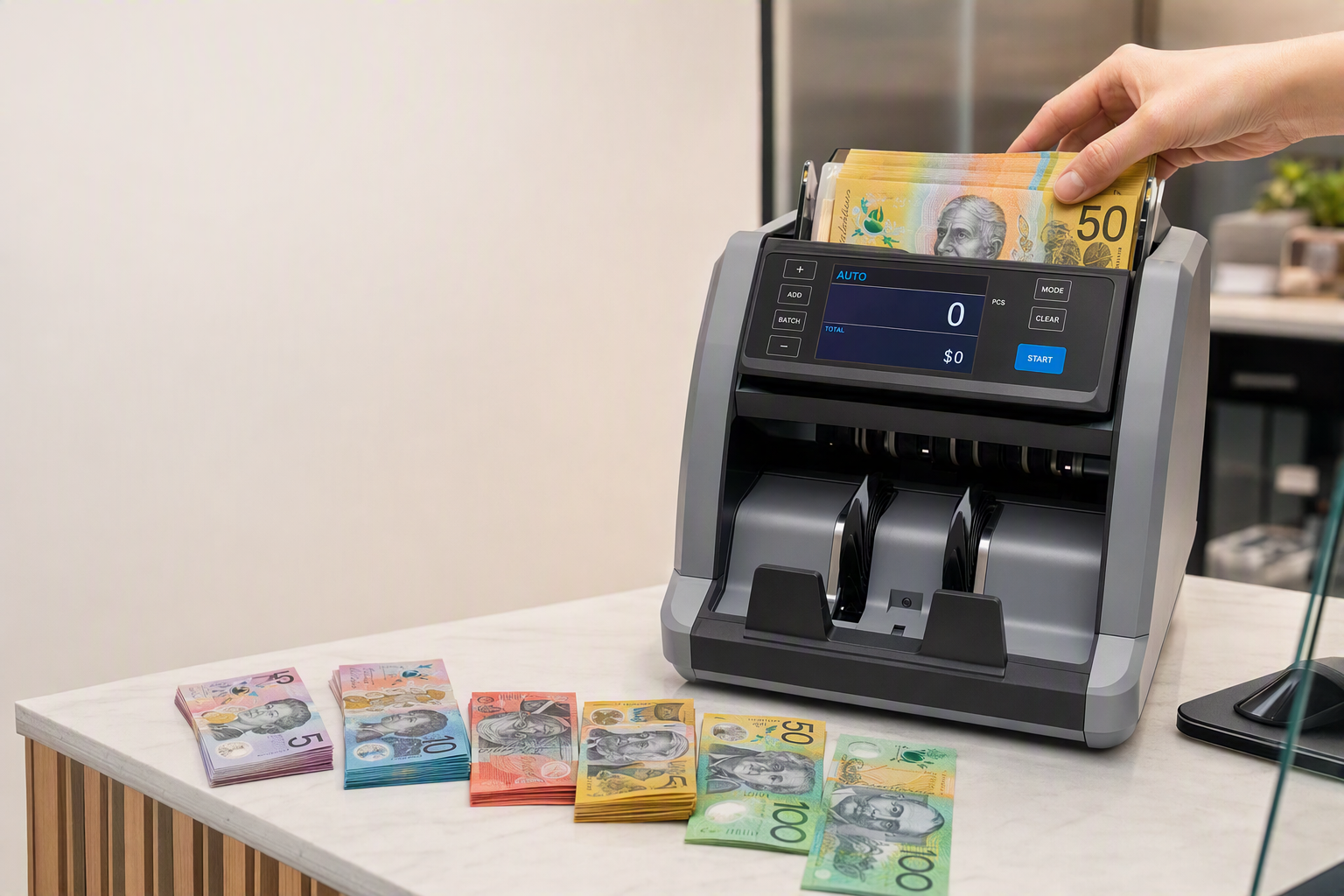
Hopper capacity is the number of notes a cash counting machine can hold in its input tray before you need to reload. Here is how much it actually matters: · For most small businesses (under 300 notes/day): hopper capacity is rarely a bottleneck. The Cashcom H110’s 500-note hopper covers a full day’s count in a single load for most single-till operations. · For higher-volume operations (300–800 notes/day): hopper capacity starts to matter. Use Add mode to accumulate across multiple loads without losing your running total. · For high-volume operations (800+ notes/day): the right machine has a larger hopper — the LS-200’s 600-note capacity or the K2’s 1,000-note hopper — to reduce reload frequency and maintain counting momentum. The honest answer: for most Australian small businesses, hopper capacity is the third or fourth most important spec — well behind detection method and build quality. But if you are in the wrong size bracket, it becomes a daily friction point worth solving. |
What Is Hopper Capacity?
The hopper is the input tray — the compartment at the top or rear of the machine where you place your note stack before counting begins. Hopper capacity refers to the maximum number of notes the machine can hold and process from a single load.
It comes up in buying decisions because it directly determines how often you have to stop, remove the counted stack from the output tray, and reload the hopper if your daily note volume exceeds the hopper’s rated capacity. A machine with a 300-note hopper being used to count a 700-note daily stack requires at least two reloads per session — each one interrupting the count and requiring the operator to manage the accumulating total manually (or use Add mode).
What hopper capacity does not determine: accuracy, counterfeit detection depth, or build quality. A machine with a 1,000-note hopper and UV-only detection is inferior to a machine with a 500-note hopper and four-method simultaneous detection. Hopper size is one specification among several — it becomes the deciding factor only when the other specifications are equal or when your volume genuinely pushes against a machine’s capacity rating.
A Day in the LifeThe shift manager at a busy pharmacy has just closed the last till at 6:00 pm. She has three till drawers to count — approximately 160, 210, and 190 notes respectively, for a total of 560 notes. She loads the first drawer’s notes into the H110’s 500-note hopper, starts the count, and switches the machine to Add mode before loading the second drawer. The machine accumulates across all three loads without resetting. The final display shows the combined value total for all three tills in under four minutes, with no manual addition required. The H110’s 500-note hopper means the largest single till (210 notes) loads with room to spare. The session requires three separate loads, but Add mode removes the friction from the multi-load process — the running total accumulates automatically, and she does not need to record intermediate results. |
Hopper, Stacker, and Reject Pocket: The Three Capacity Numbers
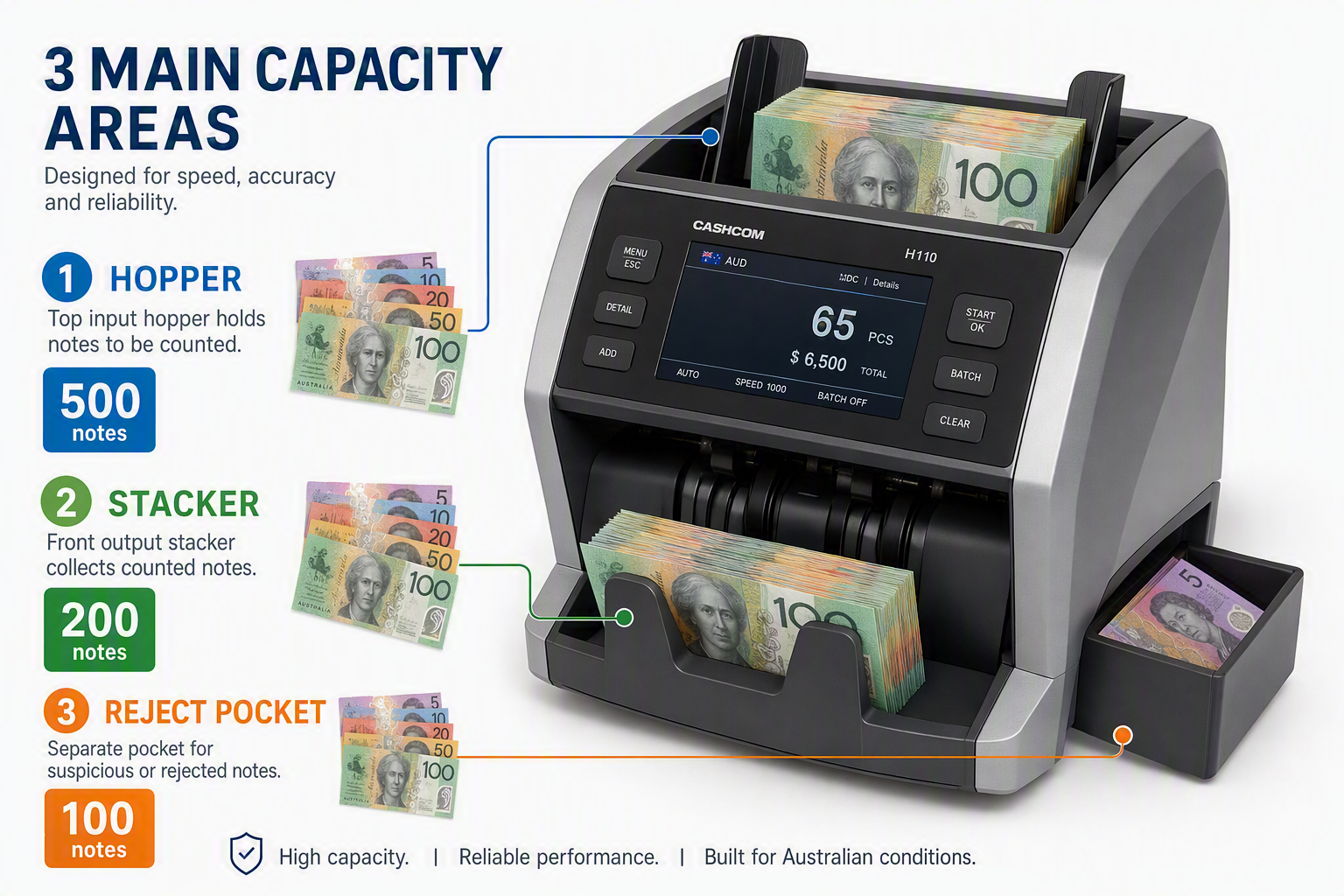
Most commercial cash counting machines list three capacity numbers — the hopper, the stacker, and the reject pocket. Understanding all three is useful because the bottleneck in a counting session is not always the hopper.
Hopper Capacity
The hopper is the input — where you load notes before counting. When the hopper empties, you add more notes or start a new load. Hopper capacity is the most commonly discussed number because it determines how often you interrupt the counting process to reload.
On the Cashcom H110, the hopper holds 500 notes. On the LS-200, it holds 600 notes and On the K2 Cash Recycler, it holds 1,000 notes. The right number depends entirely on your daily note volume and how many separate loads you are comfortable managing per session.
Stacker Capacity
The stacker is the output — where counted notes land after passing through the machine’s sensors. When the stacker reaches capacity, the machine stops (or in some modes, alerts and waits) until you clear it. A full stacker during a large-volume count is as disruptive as an empty hopper.
The Cashcom H110’s stacker holds 200 notes. For a 500-note hopper load, this means you may need to clear the stacker 2–3 times during a single full hopper run if you do not manage it actively. In practice, most operators clear the stacker between loads rather than mid-load — timing the clear to the natural break of a hopper reload.
Reject Pocket Capacity
The reject pocket collects notes that failed the machine’s counterfeit or fitness checks. On the H110, it holds 100 notes. In normal operation, the reject pocket fills slowly — a typical session might produce a handful of rejects from worn or borderline notes. But in high-risk environments (gaming venues, high-traffic tourist retail) where counterfeit exposure is elevated, monitoring the reject pocket actively is important.
A full reject pocket does not mean the machine is failing — it means it has flagged a large number of notes for manual review. Clear the reject pocket, inspect each flagged note, and continue. Do not allow the reject pocket to overflow — this results in flagged notes mixing with accepted notes in the stacker.
Hopper Capacity Across the Cashcom Range
The table below summarises the hopper, stacker, and reject capacity for each Cashcom model, alongside the business type each is built for.
| Model | Hopper | Stacker | Reject | Best For |
| Cashcom H110 | 500 notes | 200 notes | 100 notes | Small-medium business, 1–3 tills, daily close count |
| Cashcom H210 | 500 notes | 3-pocket sort | 1 reject pocket | Multi-till retail needing denomination sorting |
| Cashcom LS-200 | 600 notes | — | — | High-volume branch or retail, 3+ tills |
| Cashcom LS-300 | High cap. | — | — | All-day continuous operation, multi-site |
| Cashcom K2 Recycler | 1,000 notes | Internal cassettes | Separate reject | High-volume recycling, gaming, automated float |
The Add Mode Solution: Why Hopper Capacity Matters Less Than You Think
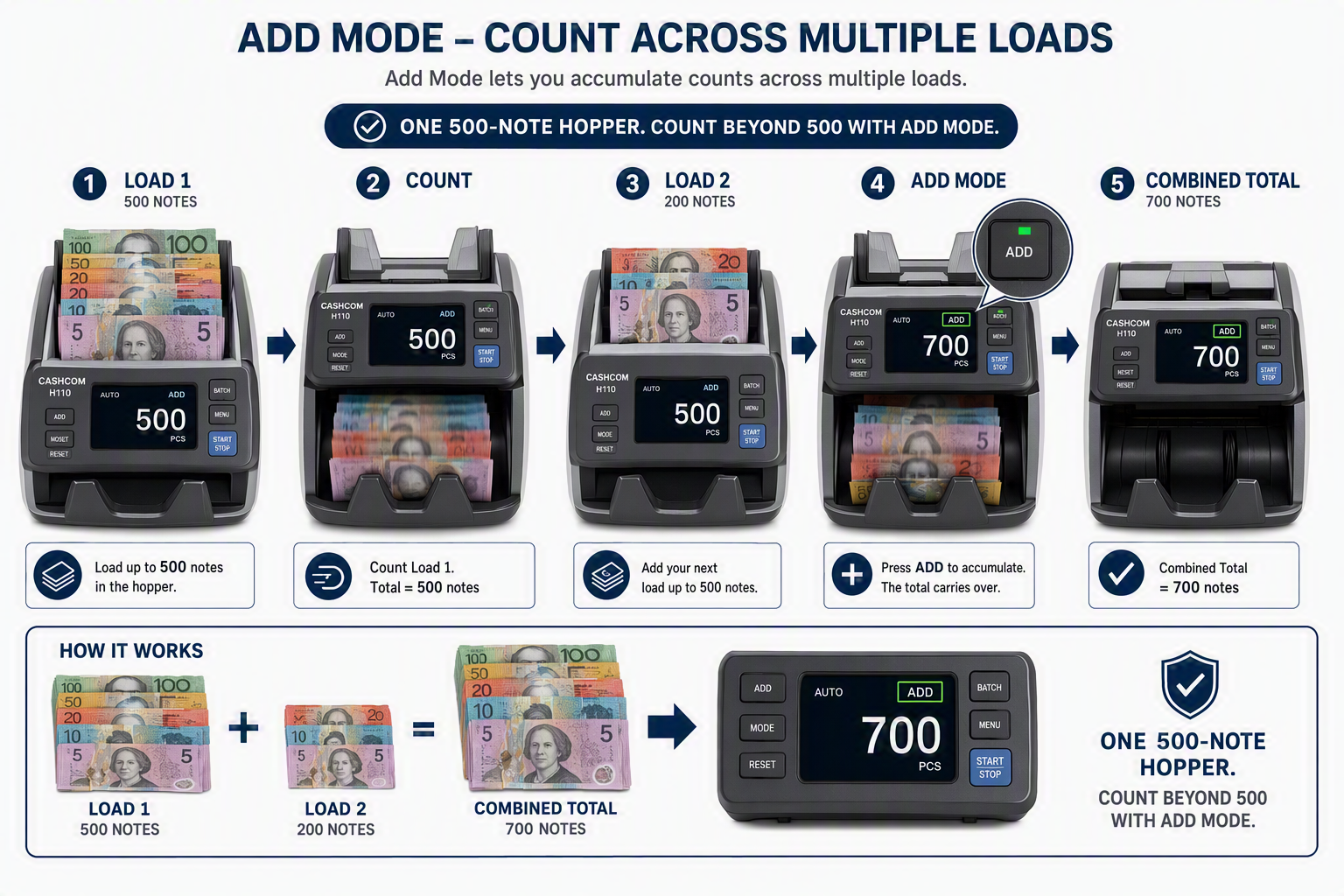
The most important thing to understand about hopper capacity is that it is not a hard ceiling on how many notes you can count per session — it is a reload interval. Add mode changes the equation significantly for businesses whose daily volume exceeds their machine’s hopper.
In Add mode, the machine accumulates a running total across multiple hopper loads without resetting between them. You count the first load, the machine displays a subtotal, you reload the hopper, count the next load, and the machine adds it to the previous total. At the end of the session, the display shows the combined total across all loads.
For a business with a 700-note daily stack using a machine with a 500-note hopper, this means:
- Load 1: 500 notes counted, subtotal displayed. Clear stacker, reload.
- Load 2: remaining 200 notes counted. Final total displayed — the accumulated value across both loads.
The two-load session takes approximately 90 seconds longer than a single-load session would. For most businesses, this is not a meaningful operational friction — the alternative (buying a larger-hopper machine than you actually need) would cost more and provide no other benefit.
| Quick Calculation
A machine with a 500-note hopper counting a 700-note daily stack at 720 notes per minute completes the count in approximately 60 seconds across two loads, including the reload interval. The same stack on a 1,000-note hopper machine takes approximately 42 seconds. The 18-second difference per session, across 300 trading days per year, equals 90 minutes of total annual time saved by the larger hopper. This is the right way to think about hopper capacity: not as a binary capability question, but as a marginal time-saving calculation against the additional cost of the higher-capacity machine. |
When Hopper Capacity Actually Matters
For most Australian small businesses, hopper capacity matters less than the marketing around it suggests. Here are the scenarios where it genuinely becomes a deciding factor:
Multi-Till High-Volume Close
A retail store counting five or six tills at end of day, each with 200–300 notes, is running a total session of 1,000–1,800 notes. With a 500-note hopper, that is 3–4 reloads per session. Each reload adds approximately 15–20 seconds and a manual stacker clear. At this volume, the LS-200’s 600-note hopper meaningfully reduces the reload count, and the machine’s 1,500-notes-per-minute speed compounds the time saving further.
Continuous Operation Environments
A bank branch or gaming venue running the machine continuously across extended trading hours — not just at close of day — benefits more from hopper capacity than a business that counts once per day. When the machine is processing notes in batches throughout the day, fewer reload interruptions per hour is a genuine operational gain. The LS-300’s all-day continuous operation design and the K2 recycler’s 1,000-note hopper are both engineered for this context.
Time-Pressured Closing Procedures
Businesses with hard closing times — a pub at 12:00 am, a club closing at 3:00 am — where the closing reconciliation has to be completed before staff can leave may find that counting speed and hopper capacity contribute meaningfully to a tighter close. At these times, every extra reload adds to the clock.
When It Does Not Matter
For a single-till café counting 150 notes per night, the H110’s 500-note hopper processes the entire day’s notes in a single load with more than half the hopper still available. Hopper capacity is not a factor in this operation — detection depth and build quality are. Buying a machine with a larger hopper for a light-volume operation provides no benefit while potentially adding cost.
Match Your Volume to the Right Hopper Size
The table below matches daily note volume to the appropriate machine and explains how many loads a typical session requires.
| Daily Note Volume | Typical Business | Loads Per Session | Right Hopper Size | Cashcom Model |
| Under 100 | Hairdresser, small service | 1 load | 300+ notes fine | H110 |
| 100–300 | Café, small retail | 1 load | 300–500 notes | H110 |
| 300–500 | Restaurant, pharmacy (1–2 tills) | 1 load | 500 notes | H110 |
| 500–800 | Busy retail (2–3 tills) | 1–2 loads | 500–600 notes | H110 + Add / H210 |
| 800–1,500 | Large retail (3–5 tills) | 2–3 loads | 600 notes | LS-200 |
| 1,500+ | High-volume (5+ tills, banking) | Multiple loads | 600–1,000 notes | LS-200 or LS-300 |
| Recycling op. | Gaming, high-traffic float mgmt. | Continuous cycle | 1,000 notes | K2 Cash Recycler |
Common Mistakes Around Hopper Capacity
- Over-weighting hopper size in the buying decision: a machine with a 1,000-note hopper and UV-only detection is a worse business investment than a machine with a 500-note hopper and four-method simultaneous detection. Hopper capacity is one spec; detection depth is the one that protects your cash.
- Loading notes without fanning: a full hopper loaded without proper note fanning is more likely to jam than a half-full hopper with well-prepared notes. The hopper’s rated capacity assumes notes are correctly fanned and aligned. See our How to Use guide for the correct loading procedure.
- Ignoring stacker capacity: a 500-note hopper paired with a 100-note stacker (not the H110’s configuration — the H110 has a 200-note stacker — but present on some budget machines) means clearing the stacker 5 times per full hopper load. Check both numbers, not just the hopper.
- Not using Add mode for multi-load sessions: running multiple hopper loads without Add mode means recording each load’s total manually and adding them up later — which partially defeats the purpose of using a machine. Add mode is standard on all Cashcom commercial models.
- Overloading the hopper: exceeding the rated capacity does not give you more notes counted — it causes misfeeds, jams, and potentially inaccurate counts. Load to the rated capacity or below, and use a second load for any excess.
Our Honest AssessmentHopper capacity gets more attention in cash counting machine marketing than it deserves as a primary buying criterion. For the large majority of Australian small businesses, the H110’s 500-note hopper is more than sufficient — most single and dual-till operations count their entire day’s notes in a single load. Where hopper capacity genuinely moves the needle is in high-volume multi-till environments and continuous-operation contexts. If your daily note count regularly pushes you into two or three loads per session, the incremental cost of moving to the LS-200’s 600-note hopper — combined with its significantly higher counting speed — is justified. If it does not, the H110 is the right machine regardless of what hopper size the spec sheet shows. |
Frequently Asked Questions
| Question | Answer |
What is hopper capacity on a cash counting machine? |
Hopper capacity is the maximum number of notes the machine’s input tray can hold for a single counting run. When the hopper empties, you reload with more notes. The Cashcom H110 has a 500-note hopper, the LS-200 holds 600, and the K2 Cash Recycler holds 1,000. |
How many notes should my cash counting machine hopper hold? |
Match hopper size to your daily note volume. Under 300 notes per day: a 300–500 note hopper covers the full session in a single load. 300–600 notes per day: a 500-note hopper (H110) with Add mode handles this in one or two loads. Over 600 notes per day or multi-till high-volume: consider the LS-200’s 600-note hopper or the K2’s 1,000-note capacity. |
What happens if I put more notes in the hopper than its capacity? |
Overloading the hopper causes misfeeds and jams, and can reduce count accuracy. Always load to the rated capacity or below. Use Add mode to accumulate totals across multiple hopper loads rather than trying to load more notes than the machine is rated for. |
What is Add mode on a cash counting machine? |
Add mode lets the machine accumulate a running total across multiple hopper loads without resetting between them. You load the first batch, count, then load the next batch — the machine adds the second count to the first and displays the combined total. This effectively extends the machine’s per-session capacity beyond the hopper’s physical limit. |
Is the stacker capacity as important as the hopper capacity? |
Both matter. The hopper determines how often you reload; the stacker determines how often you clear the output. A machine with a large hopper but a small stacker may need the stacker cleared multiple times during a single hopper run. Check both specifications — the Cashcom H110 has a 500-note hopper and a 200-note stacker, which are well matched for typical small business volumes. |
Does a larger hopper mean better counting accuracy? |
No. Hopper capacity has no relationship to counting accuracy or counterfeit detection depth. A larger hopper simply means fewer reloads per session. Accuracy and detection are determined by the machine’s sensor type and calibration — specifically UV, MG, IR, and CIS detection methods. |
Find the Right Machine for Your Daily Volume
If you are unsure whether your daily note volume fits within a machine’s hopper capacity or whether Add mode is sufficient for your workflow, the Cashcom team can advise based on your operation.
Call: 0451 353 676 | Email: sales@cashcom.com.au | Web: cashcom.com.au
Also see: How to Use a Cash Counting Machine: Step-by-Step Guide — for the correct hopper loading procedure, including how to fan notes before loading for best results.
About the Author
This article was prepared by the Cashcom Team, Australian Cash Handling Specialists since 2015. Cashcom supplies and services cash counting, sorting and recycling equipment for retail, hospitality, banking, gaming and cash-in-transit businesses across Australia.
Get in touch: 0451 353 676 | sales@cashcom.com.au | cashcom.com.au